
|
Online Lookup for License and Hospital Verifications |
|
When the Verification area is in License or
Hospital Affiliation, a special  task button has been installed.
Online License Verification
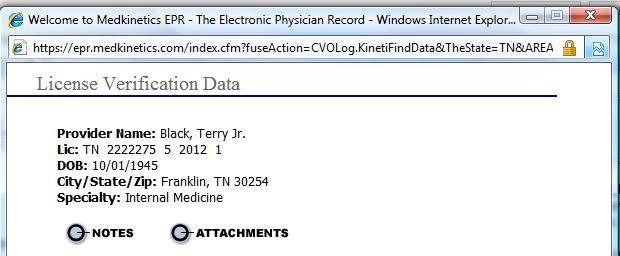
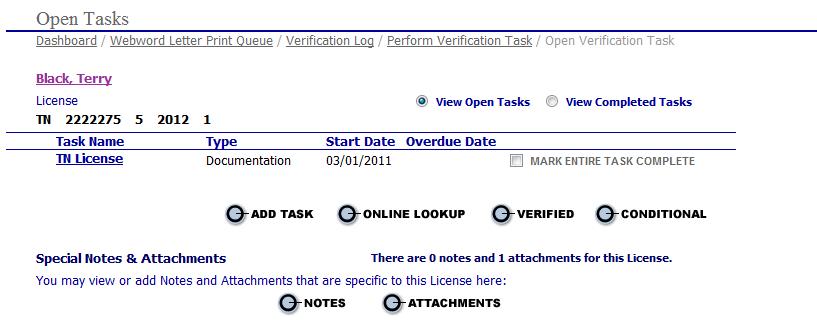
The button launches a popup window that summarizes the provider's license data. A separate browser window also opens to the search page of the license verification website for the relevant state. It is easy to copy and paste the license number or the provider name into the search screen to obtain the license documentation.
A screen capture or downloaded report from
the website may be attached or a note may be entered to document the validity
of the license using the Notes and Attachments buttons on the license
popup. The
specialist will then choose the  button to close the task.
Online Hospital Verification
The web address for obtaining hospital affiliation letters may be entered on the Hospital page in the Hospital URL field. When this data is present, the URL is carried into the verification log and the Online Lookup task button appears.

Press "Online Lookup" to open a popup with the provider's full name, DOB and specialty.
 Please note that the URL must
be complete, including the protocol (http:// or https://). If this portion
of the address has been omitted when the hospital data is submitted, a
validater will insert "http://" at the beginning of the URL.
Please note that the URL must
be complete, including the protocol (http:// or https://). If this portion
of the address has been omitted when the hospital data is submitted, a
validater will insert "http://" at the beginning of the URL.
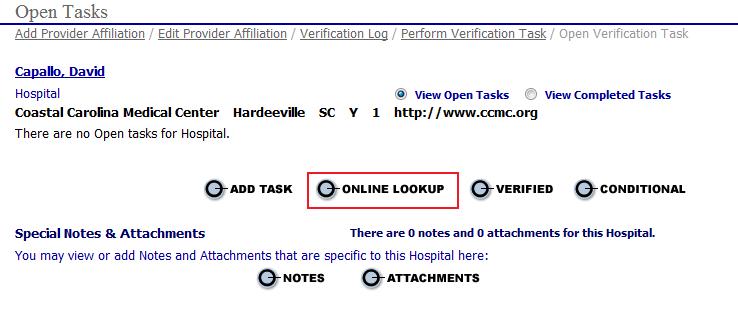

Simultaneously, another browser window opens to the specified URL. From there the document can be saved to a drive and attached to the verification using the "Attachments" button in the popup.
A screen capture or downloaded report from
the website may be attached or a note may be entered to document the validity
of the license using the Notes and Attachments buttons on the license
popup. The
specialist will then choose the button to close the task.
