
|
Verifications Administration |
|
"Verification Administration" consists of the following sections: Verification Types, Other Items Maintenance, To-Do List Preferences, and Owner Preferences. These areas are able to be customized for each facility in the Verification Admin section as shown.
The settings for "To-Do List Preferences" and "Owner Preferences" are optional! They are not required for the Verification Log to work. The settings were designed to help manage work flow for organizations that perform a large volume of verifications. To-Do List Preferences and Owner Preferences take into consideration that the work load may be divided among several specialists each with a different task to complete prior to sending the log item for Pre-Committee Review".
To access the administration page perform the following steps:
To
access the verification log select  on the EPR system main
menu bar and choose "Admin"
from the drop-down menu.
on the EPR system main
menu bar and choose "Admin"
from the drop-down menu.
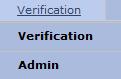
A second drop-down menu will display.
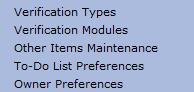
Based on the required administration functions go to one of the links below:
